
HUDFramework
Утилита «HUDFramework» является основой (ядром) для пользовательского интерфейса, который добавляет возможность добавления новых элементов интерфейса на экране из модов, бесконфликтным способом. Статы, время, виджеты и многое другое! Добро пожаловать в новый мир моддинга интерфейса игры.
Требования:
Fallout 4
Java 8 и выше (для патчера «HUDFramework auto-patcher»).
Примечание.
3. Если вы получили сообщение о перезаписи файла HUDMenu.swf, то у вас есть какой-то установленный в игре мод, так-же изменяющий интерфейс игры. Чтобы использовать оба мода одновременно, вам нужно внедрить «HUDFramework» в другой мод, используя авто-патчер «HUDFramework auto-patcher». Скачайте по доп.ссылке, создайте любую пустую папку и поместите в нее папку Autopatcher 1.0 из архива.
* Как использовать «HUDFramework auto-patcher»:
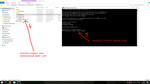
— Откройте файл autopatch.cmd двойным нажатием мышки для запуска авто-патчера HUDFramework.
— Авто-патчер автоматически внедряет HUDFramebook в любой файл HUDMenu.swf
— Убедитесь что файл HUDMenu.swf, который вы будете исправлять, находится в текущем каталоге, то есть там где файл autopatch.cmd
— Исправленный файл будет называться HUDMenu_patched.swf
— Исходный файл HUDMenu.swf не будет изменен.
— Чтобы использовать уже исправленный файл HUDMenu.swf, переименуйте HUDMenu_patched.swf в HUDMenu.swf и поместите его в папку игры по пути Data/Interface с заменой. 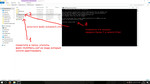
Please log in or register
To enjoy the benefits of Nexus Mods, please log in or register a new account
HUDFramework
File information
Last updated
Original upload
Created by
Uploaded by
Virus scan
Tags for this mod
About this mod
HUDFramework is a UI framework that makes it possible for mods to add new UI elements to the HUD.
This mod does not have any known dependencies other than the base game.
Mods requiring this file
Author’s instructions
File credits
This author has not credited anyone else in this file
Donation Points system
This mod is opted-in to receive Donation Points
[size=15] HUDFramework [/size]
★ ABOUT ★
HUDFramework is a UI framework that makes it possible for mods to add new UI elements to the HUD in a conflict-free way.
Stats, time, widgets. and more! Welcome to a new world of UI modding.
★ DETAILS ★
Previously, any mod modifying the HUD would necessarily overwrite and conflict with every other HUD mod. HUDFramework solves this by dynamically loading individual interface mods into the HUD at runtime. It gives modders the tools to load custom widgets and communicate with their widgets.
Note that you need to have a mod installed that uses the framework to see any widgets! If you’re looking for HUDFramework mods to install, there’s a list on the sticky in the Comments section.
★ INSTALLATION ★
1. Install with your preferred mod manager, or copy the files in the download to your Fallout 4 Data folder.
2. Activate HUDFramework.esm in your mod manager, or via the Mods menu.
Note: If you receive a message about overwriting HUDMenu.swf, then you have an existing UI mod installed. To use both together, you can inject HUDFramework into the other mod using the HUDFramework auto-patcher. See the Compatibility section.
★ FEATURES (for mod authors) ★
★ USAGE EXAMPLES ★
Retrieving a reference to HUDFramework:
➲ HUDFramework hud = HUDFramework.GetInstance()
Load UI Widget:
➲ hud.RegisterWidget(Self, «MyWidget.swf», 100, 100)
➲ hud.LoadWidget(«MyWidget.swf»)
Communicate with UI widget:
➲ hud.SendMessage(«MyWidget.swf», UpdateResourceBar, 100)
Show/hide compass:
➲ hud.Eval(«hud.BottomCenterGroup_mc.CompassWidget_mc.visible = false;»)
★ WHAT’S POSSIBLE ★
★ COMPATIBILITY ★
★ CREDITS & ACKNOWLEDGEMENTS ★
BISE Scripting Engine for making dynamic AS3 evaluation possible.
RABCDASM for robust, nondestructive SWF disassembly and assembly.
F4SE for Scaleform logging.
Please log in or register
To enjoy the benefits of Nexus Mods, please log in or register a new account
HUDFramework
File information
Last updated
Original upload
Created by
Uploaded by
Virus scan
Tags for this mod
About this mod
HUDFramework is a UI framework that makes it possible for mods to add new UI elements to the HUD.
This mod does not have any known dependencies other than the base game.
Mods requiring this file
Author’s instructions
File credits
This author has not credited anyone else in this file
Donation Points system
This mod is opted-in to receive Donation Points
[size=15] HUDFramework [/size]
★ ABOUT ★
HUDFramework is a UI framework that makes it possible for mods to add new UI elements to the HUD in a conflict-free way.
Stats, time, widgets. and more! Welcome to a new world of UI modding.
★ DETAILS ★
Previously, any mod modifying the HUD would necessarily overwrite and conflict with every other HUD mod. HUDFramework solves this by dynamically loading individual interface mods into the HUD at runtime. It gives modders the tools to load custom widgets and communicate with their widgets.
Note that you need to have a mod installed that uses the framework to see any widgets! If you’re looking for HUDFramework mods to install, there’s a list on the sticky in the Comments section.
★ INSTALLATION ★
1. Install with your preferred mod manager, or copy the files in the download to your Fallout 4 Data folder.
2. Activate HUDFramework.esm in your mod manager, or via the Mods menu.
Note: If you receive a message about overwriting HUDMenu.swf, then you have an existing UI mod installed. To use both together, you can inject HUDFramework into the other mod using the HUDFramework auto-patcher. See the Compatibility section.
★ FEATURES (for mod authors) ★
★ USAGE EXAMPLES ★
Retrieving a reference to HUDFramework:
➲ HUDFramework hud = HUDFramework.GetInstance()
Load UI Widget:
➲ hud.RegisterWidget(Self, «MyWidget.swf», 100, 100)
➲ hud.LoadWidget(«MyWidget.swf»)
Communicate with UI widget:
➲ hud.SendMessage(«MyWidget.swf», UpdateResourceBar, 100)
Show/hide compass:
➲ hud.Eval(«hud.BottomCenterGroup_mc.CompassWidget_mc.visible = false;»)
★ WHAT’S POSSIBLE ★
★ COMPATIBILITY ★
★ CREDITS & ACKNOWLEDGEMENTS ★
BISE Scripting Engine for making dynamic AS3 evaluation possible.
RABCDASM for robust, nondestructive SWF disassembly and assembly.
F4SE for Scaleform logging.
Please log in or register
To enjoy the benefits of Nexus Mods, please log in or register a new account
HUDFramework
File information
Last updated
Original upload
Created by
Uploaded by
Virus scan
Tags for this mod
About this mod
HUDFramework is a UI framework that makes it possible for mods to add new UI elements to the HUD.
This mod does not have any known dependencies other than the base game.
Mods requiring this file
Author’s instructions
File credits
This author has not credited anyone else in this file
Donation Points system
This mod is opted-in to receive Donation Points
[size=15] HUDFramework [/size]
★ ABOUT ★
HUDFramework is a UI framework that makes it possible for mods to add new UI elements to the HUD in a conflict-free way.
Stats, time, widgets. and more! Welcome to a new world of UI modding.
★ DETAILS ★
Previously, any mod modifying the HUD would necessarily overwrite and conflict with every other HUD mod. HUDFramework solves this by dynamically loading individual interface mods into the HUD at runtime. It gives modders the tools to load custom widgets and communicate with their widgets.
Note that you need to have a mod installed that uses the framework to see any widgets! If you’re looking for HUDFramework mods to install, there’s a list on the sticky in the Comments section.
★ INSTALLATION ★
1. Install with your preferred mod manager, or copy the files in the download to your Fallout 4 Data folder.
2. Activate HUDFramework.esm in your mod manager, or via the Mods menu.
Note: If you receive a message about overwriting HUDMenu.swf, then you have an existing UI mod installed. To use both together, you can inject HUDFramework into the other mod using the HUDFramework auto-patcher. See the Compatibility section.
★ FEATURES (for mod authors) ★
★ USAGE EXAMPLES ★
Retrieving a reference to HUDFramework:
➲ HUDFramework hud = HUDFramework.GetInstance()
Load UI Widget:
➲ hud.RegisterWidget(Self, «MyWidget.swf», 100, 100)
➲ hud.LoadWidget(«MyWidget.swf»)
Communicate with UI widget:
➲ hud.SendMessage(«MyWidget.swf», UpdateResourceBar, 100)
Show/hide compass:
➲ hud.Eval(«hud.BottomCenterGroup_mc.CompassWidget_mc.visible = false;»)
★ WHAT’S POSSIBLE ★
★ COMPATIBILITY ★
★ CREDITS & ACKNOWLEDGEMENTS ★
BISE Scripting Engine for making dynamic AS3 evaluation possible.
RABCDASM for robust, nondestructive SWF disassembly and assembly.
F4SE for Scaleform logging.
Please log in or register
To enjoy the benefits of Nexus Mods, please log in or register a new account
HUDFramework
File information
Last updated
Original upload
Created by
Uploaded by
Virus scan
Tags for this mod
Mod articles
Q: How do I get started?
A: Download the example widget from the Files section! It’s named «HUDFramework Sample Widget». It’s a simple HUD widget that tracks and displays on-screen the number of kills the player has made. It contains all the information you need to load a widget and send data to it.
For more advanced widgets, check out the sources for HoloTime and Companion Status HUD, which are available on their respective mod pages.
Q: Does adding HUDFramework to my existing mod mean that it will have a hard requirement on HUDFramework?
A: Absolutely not! Adding HUDFramework as a master makes sense if your mod is solely a HUD widget or wouldn’t otherwise work without HUDFramework. If you already have an exis.
What do I need to create a HUD widget?
*** Before you start, download the HUDFramework Sample Widget from the Files tab for a simple widget example! ***
Copy contents of the two folders in the HUDFramework Development Kit into your Papyrus source folder and Flash project folder, respectively.
First, create your HUD widget in Flash. Add text, graphics, etc. as you see fit. Use white color (#000000) for all your UI ele.